
Kali Linux is completely a rebuild of Backtrack Linux, Backtrack named as Kali now, maintain completely to Debian development models.
Kali Linux 1.1.0 Installation
Kali Linux is totally free of cost, and mostly used for penetrating
testing in any small to large scale organizations to protect their
network from attackers. It contains more than 300 penetrating testing
tools and supports most of the today’s hardware and devices such as
Raspberry Pi, Samsung Chromebook, Galaxy Note etc..
Under 2 years of public development, on 9th Feburary 2015, Mati Aharoni has announced the first point release of Kali Linux 1.1.0, which brings mix of extraordinary hardware support as well as rock solid performance.
What’s new in Kali 1.1.0
- Kali Linux 1.1.0 runs on Kernel 3.18, patched for wireless injection attacks.
- Improved Wireless driver support for both kernel and firmware upgrade for Wireless devices.
- Support for NVIDIA Optimus hardware.
- Updated packages and instructions for virtual-box tool, vmware-tools and openvm tools.
- Grub Screen and wallpapers were changed in Kali 1.1.0.
- Almost 58 bug fixes are fixed in current release.
This article will walk through the basic installation procedure for the latest release of Kali Linux 1.1.0
with screenshots on Hard Disk, as well as the upgrade procedures for
those users who already running older version of Kali Linux using simple
apt commands.
Installing Kali Linux on your computer is pretty simple and very easy
process, all you need is a compatible computer hardware. The hardware
Prerequisites are very minimal as listed below.
Installation Prerequisites
- Kali Linux required a minimum of 10 GB hard disk space for installation.
- A minimum of 512MB Ram for i386 and amd64 architectures.
- A bootable CD-DVD Drive or a USB stick.
My Environment Setup
IP Address : 192.168.0.155
Hostname : kali.tecmintlocal.com
HDD Size : 27 GB
RAM  : 4 GB
Installing Kali Linux 1.1.0
1. First go the download page of Kali Linux at below
address and grab the latest version of Kali Linux ISO file for your
system architecture.
2. After downloading, either burn the downloaded ISO
image to CD/DVD drive, or prepare a USB bootable stick with Kali Linux
Live as the installation medium. If you don’t know how to make an USB as
bootable stick, read the article that shows how to install Linux from USB.
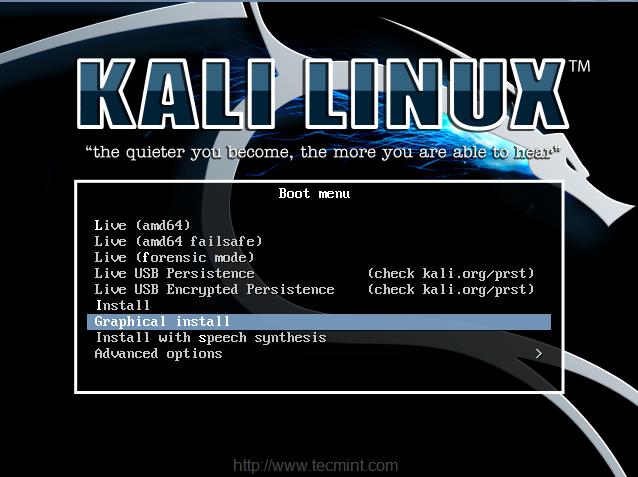
3. To start the installation process, boot the Kali Linux with your chosen installation medium CD/DVD or USB. You should be presented with the Kali Boot screen. Select either Graphical or Text mode installation. In this example, I’m going to choose graphical installation.
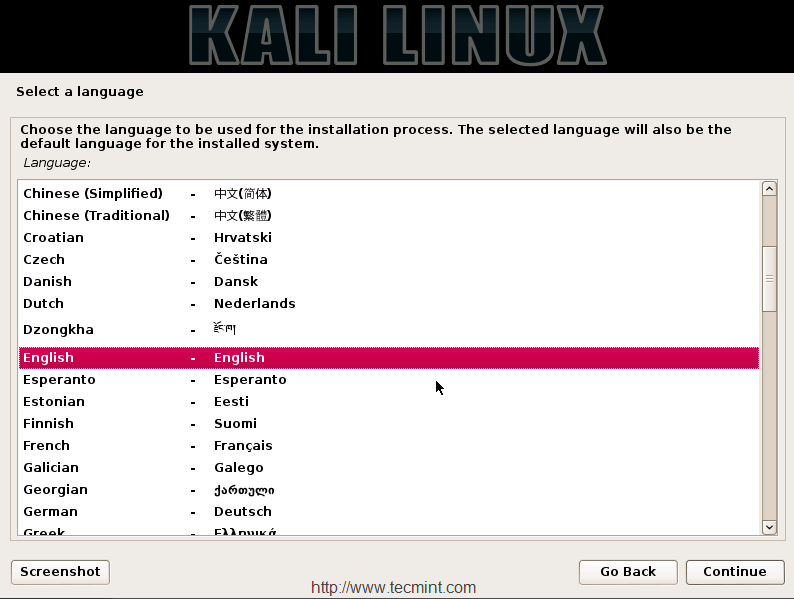
4. Choose your respective language for the installation and then your country location, this should be location were you live. You will also need to configure your keyboard language with correct keymap.
 About the Author


0 التعليقات: